Author: Praphulla Hada

  • Technical SEO Analysis of Daraz and Sastodeal

    Technical SEO Analysis of Daraz and Sastodeal

    Technical SEO refers to optimizing a website’s technical aspects to improve efficient crawlability and indexability. It encompasses various strategies and practices focused on enhancing the website’s infrastructure.

    Any website should be able to focus on at least the basics of technical SEO aspects like XML sitemaps, Robotstxt, URL structures, and schema markup (structured data). Both e-Commerce giants have covered the basics but one (Daraz) does it better than the other (Sastodeal).

    Here’s the technical seo analaysis of Daraz and Sastodeal.

    Website Structure

    Daraz is fully aware of optimizing for the technical SEO aspects during site development. Daraz’s multiple content type like product detail page (PDP), category listing page (CLP), product listing page(PLP), brand page, and store page are organized and interconnected very well.
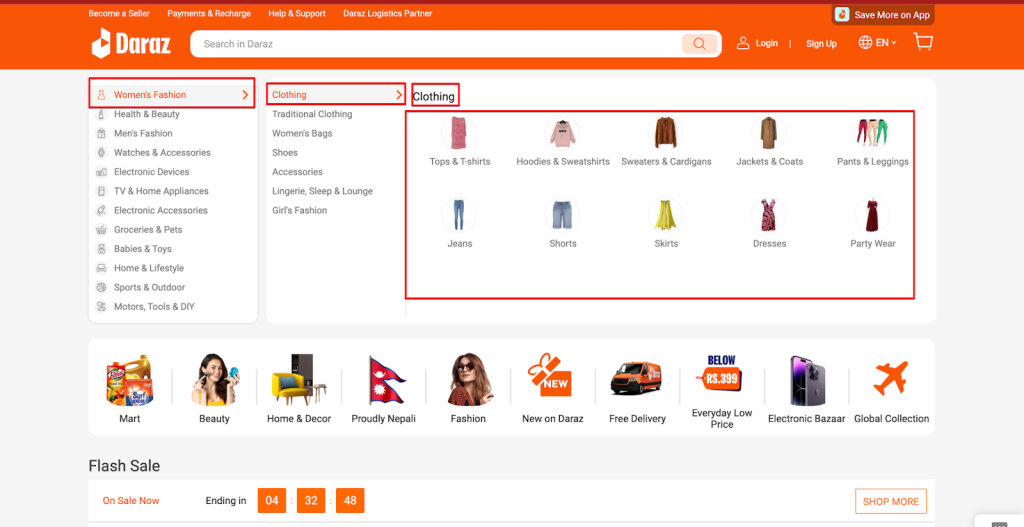

    As customers of eCommerce platforms, the best thing for us is the user journey. Users can feel this while navigating the product categories: For eg; Women’s Fashion -> Clothing -> Jeans, Shirts & More.

    • Women’s Fashion: Broad Category, which is simply a plain text
    • Clothing: Category Listing Page (CLP), which includes all sub-categories that fall under the broad category of clothing.
    • Jeans, Shirts & More: Product Listing Page (PLP), which includes specific products that fall under the sub-categories

    Daraz has a clear and structured navigation system, with categories like Women’s Fashion, Health & Beauty, Men’s Fashion, etc. This helps users and search engines understand and navigate the products easily.

    URL Structure

    A site’s URL structured needs to be simple and yet should be able to carry out the meaning such as primary keyword or at least a short variation of it. And, Daraz’s URL structure is just that. This is how Daraz has structured URLs for different content types:

    Product Details Page -> https://www.daraz.com.np/products/product-name/

    Category Listing Page -> https://www.daraz.com.np/category-listing-name/

    Product Listing Page -> https://www.daraz.com.np/product-listing-name/

    Brand Page -> https://www.daraz.com.np/product-listing-name/brand-name/

    Store Page -> https://www.daraz.com.np/shop/shop-name/

    See how Daraz constructed URLs simply and logically that are most intelligible to humans (readable words rather than long ID numbers).

    On the other hand, Sastodeal’s URL structuring is quite poor. Some examples of poorly constructed URLs are:

    https://www.sastodeal.com/default/sd-fast/food-essentials/rice-rice-products.html
    https://www.sastodeal.com/default/sd-fast/food-essentials/rice-rice-products/sd-336943-423-salesberry-5304.html

    But, why are the above Sastodeal’s URLs poor?

    • First and important one, the folder depth is way too far. This can have a negative impact on the crawlability and indexability.
    • Second, the URLs are longer, unintelligible and don’t contain a descriptive keyword like Daraz did, which can negatively impact how Google understands the page.

    Canonicalization & Duplicate content

    A product category can have multiple facets or filters that can cause duplicate pages. Likewise, a single product can have multiple variations like color, size and more which can cause massive duplicate page issues.

    For instance, a product page t-shirt with a 3 color variation with 4 sizes option can have 12 independent pages. If the pages aren’t handled using canonicalization, massive duplicate page issues may negatively impact the SEO visibility and ranking.

    So what to do in such cases? To help Google understand which variant is best to show in Search, we should choose one of the product variant URLs as the canonical (main) URL for the product.
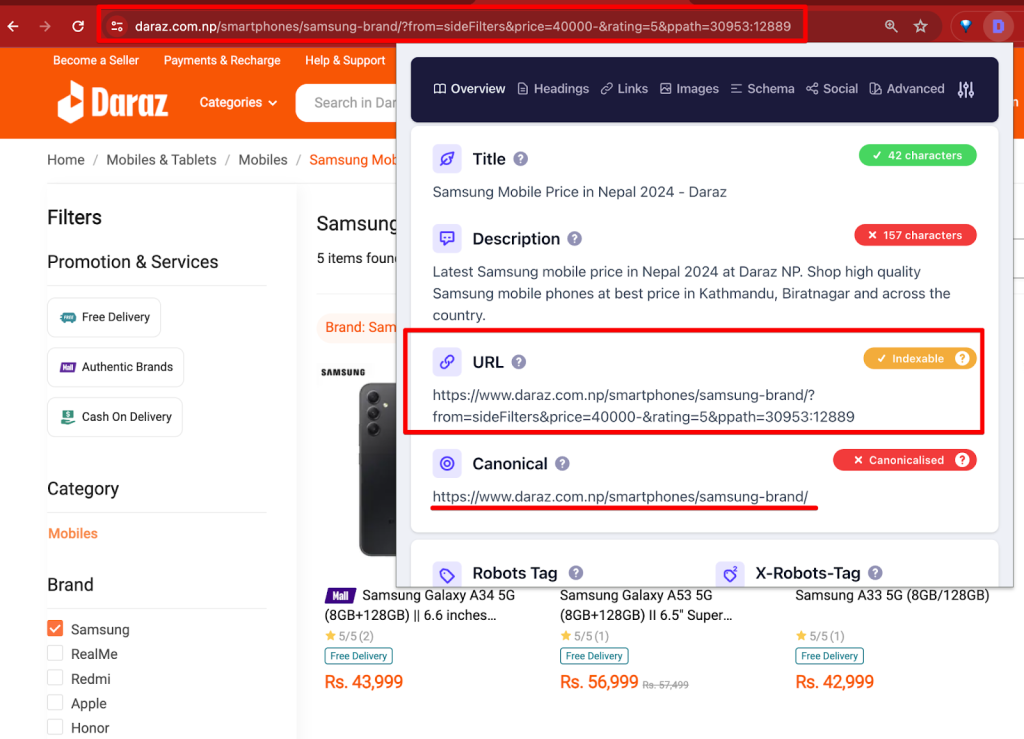
    This is where the canonical tag (aka “rel canonical”) comes into play. It is a way of telling search engines that a specific URL represents the master copy of a page. Using the canonical tag helps to prevent problems caused by identical or “duplicate” content appearing on multiple URLs. Essentially, it tells search engines which version of a URL you want to appear in search results.

    Daraz is pretty great at handling duplicate page content issues and handled smartly using canonicalization techniques.

    Quick Note: It’s important to note that the canonical tag is generally a hint, not an absolute directive, to search engines. While search engines often respect canonical tags, they may ignore them in certain cases if they think a different page is more appropriate.

    Internal linking

    Search Engines like Google uses links as the strongest signal when determining the relevancy of pages. The internal links help the search engine bots to find the new pages as well.
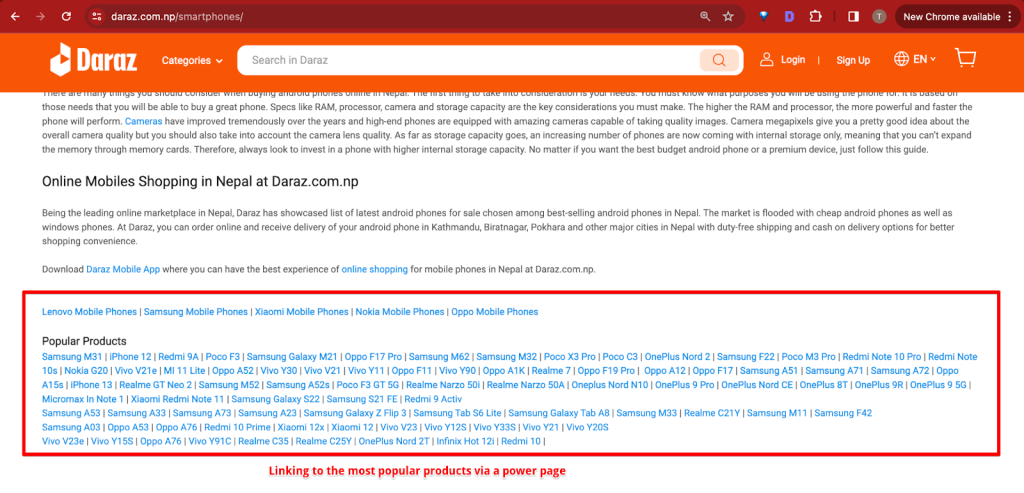
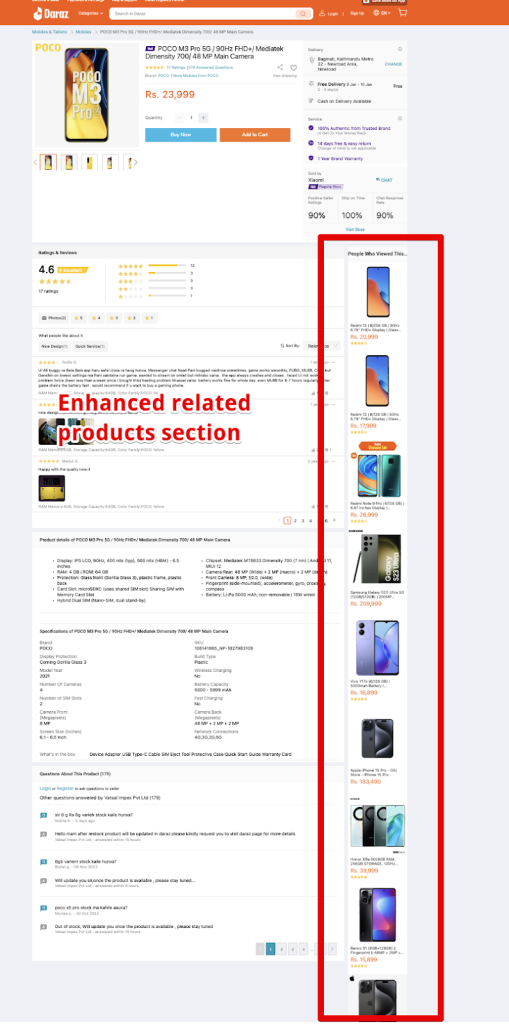
    The “Related Products” section on an eCommerce website plays a crucial role in SEO. Why? Because of couple of reasons.

    First, it enhances user engagement by keeping visitors on the site longer as they browse through additional items.

    Second, it creates an opportunity for internal linking, which is vital for SEO. By linking related products, the website can spread link equity and help search engines better understand the site’s structure and content relevance.

    Third, it aids in the discovery of more pages by search engine crawlers, increasing the likelihood of additional pages being indexed.

    Breadcrumbs

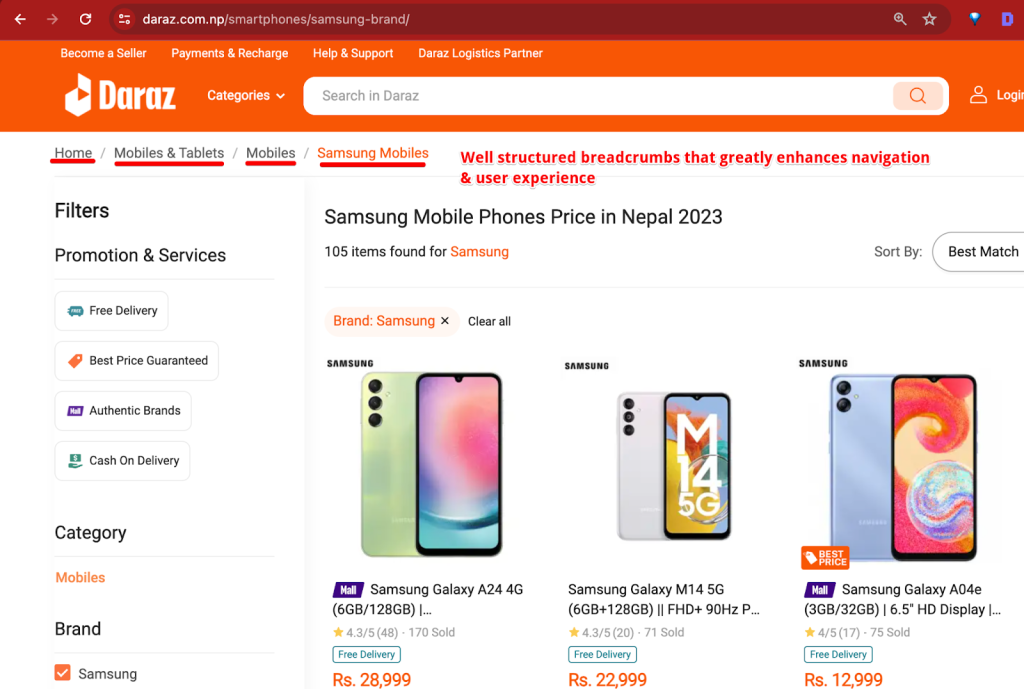
    Breadcrumbs are a navigational feature that enhances user experience and site structure, aiding in understanding a website’s hierarchy. Using proper breadcrumbs will make sure search engine bots crawls and understands the site’s architecture more efficiently.
    Structured Data

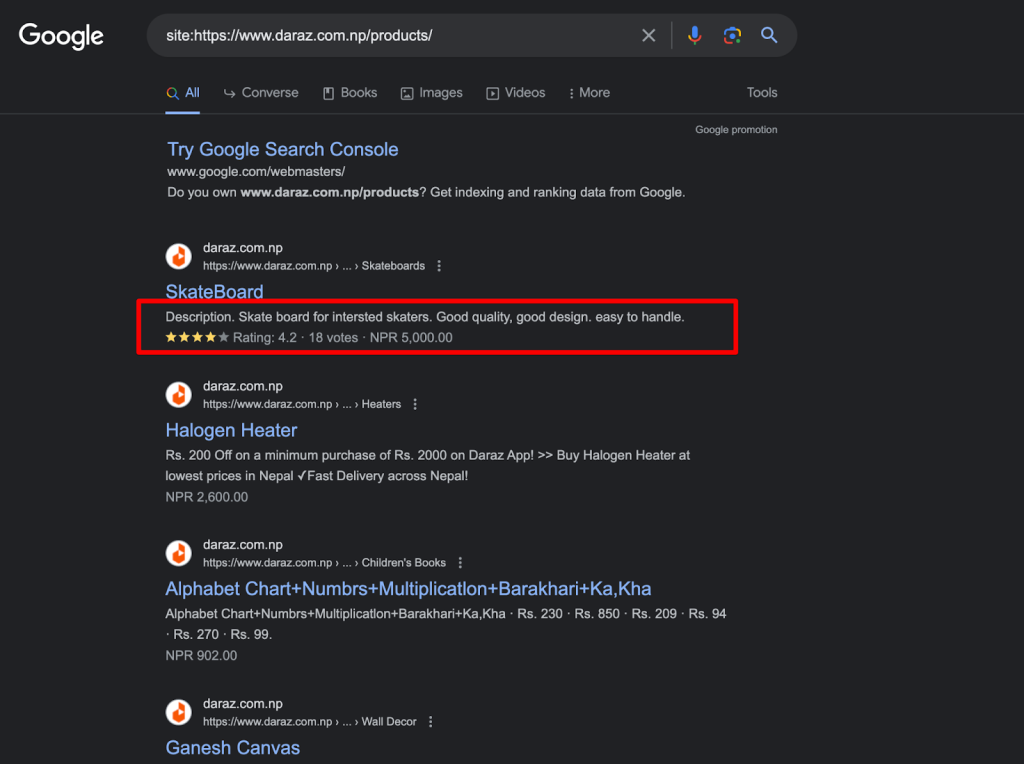
    Structured data/schema markup is a code that helps search engines understand the page better. It is the natural language for the search engines to connect dots between the entities and display respective rich results.
    XML Sitemaps

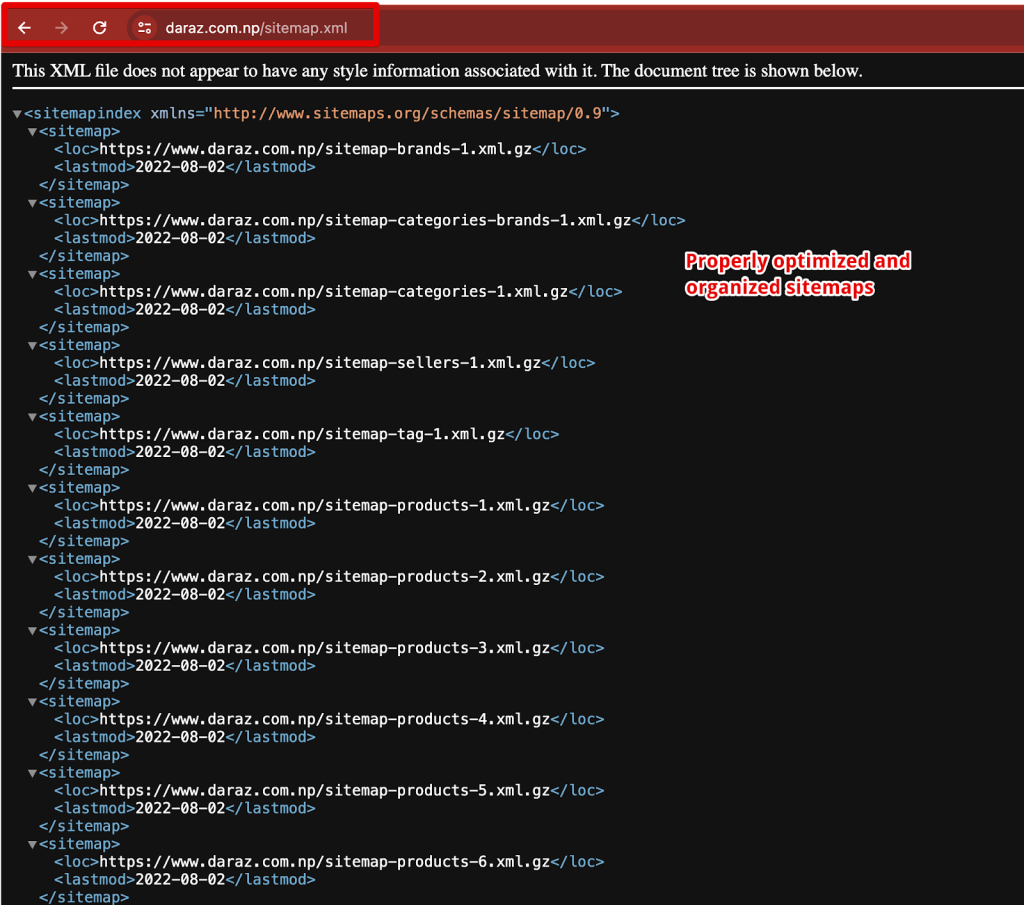
    The sitemap of Daraz is well-optimized for search engine bots for several reasons like structured format, Gzip Compression, and love the way they have categorized the sitemap for different content types like products, categories, brands and more.
    robots.txt

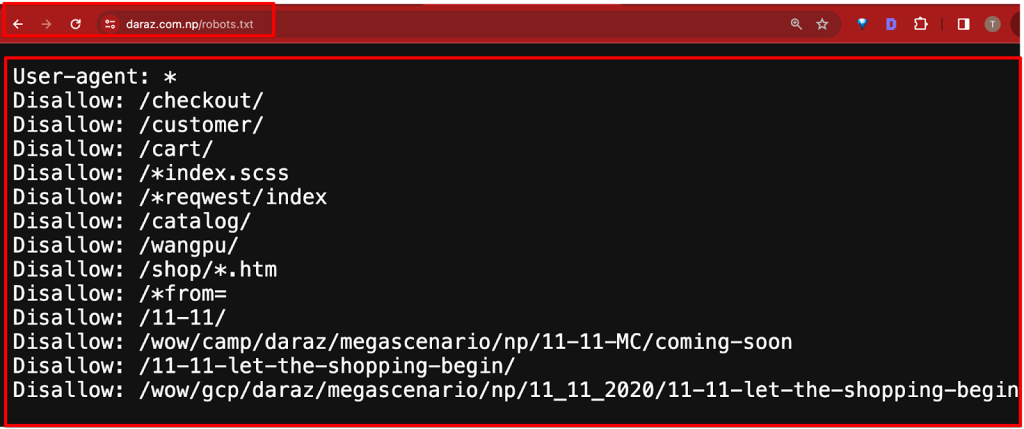
    The Daraz’s robots.txt file is well-optimized for search engine bots. It strategically disallows sections of the site that are either not meant for public consumption (like customer profiles, carts, and checkout pages) or are less relevant (like temporary event pages or specific technical directories). This approach helps in directing search engine bots to index the more important and relevant parts of the site, enhancing the crawl budget and the site’s overall SEO performance.
    Core Web Vitals & Page Experience

    Google’s Core Web Vitals is a set of metrics that evaluate the user experience of a web page, focusing on load time, interactivity, and visual stability. These include:

    Largest Contentful Paint (LCP), that measures amount of time to render the largest content element visible in the viewport, from when the user requests the URL.

    First Input Delay (FID), that assesses time from when a user first interacts with your page (when they clicked a link, tapped on a button, and so on) to the time when the browser responds to that interaction.

    Cumulative Layout Shift (CLS), that measures the sum total of all individual layout shift scores for every unexpected layout shift that occurs during the entire lifespan of the page.

    And, the latest addition to these metrics is the Interaction to Next Paint (INP), that assesses a page’s overall responsiveness to user interactions by observing the time that it takes for the page to respond to all click, tap, and keyboard interactions that occur throughout the lifespan of a user’s visit to a page.

    These factors are crucial for Google’s search rankings, as they aim to ensure a fast, responsive, and stable user experience.
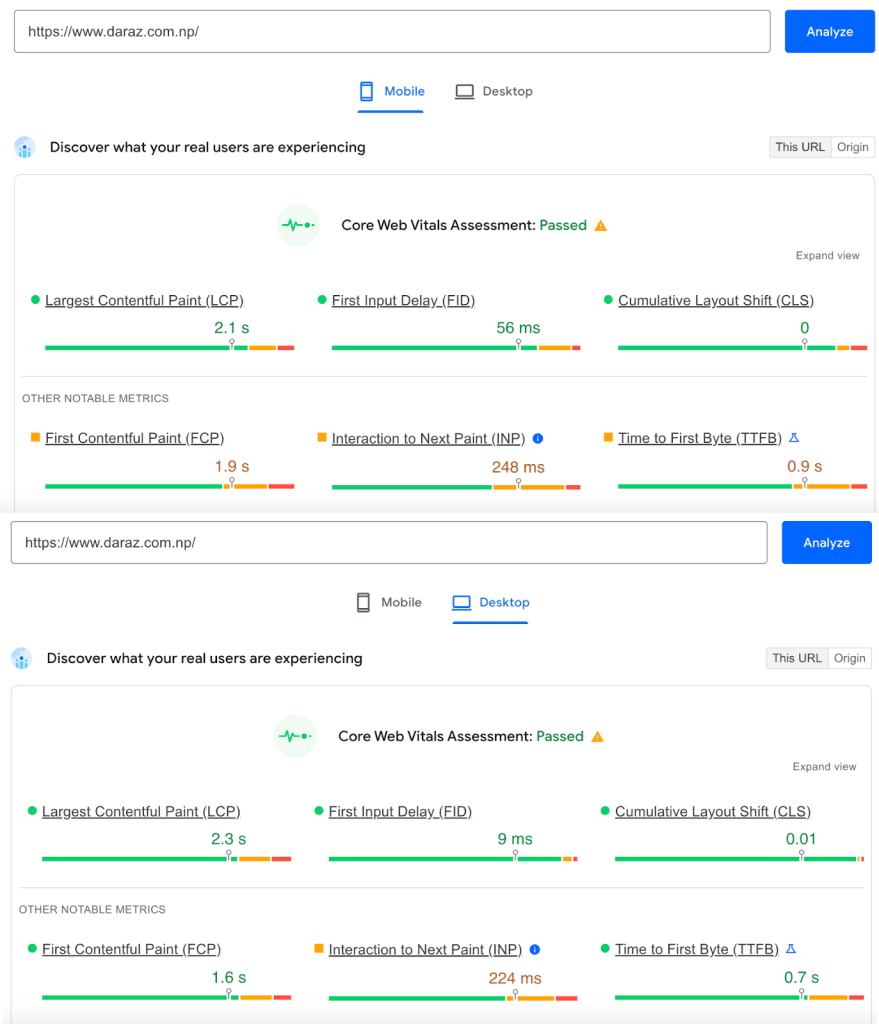
    While comparing CWVs and the page experience of Daraz;

    • Pages have good Core Web Vitals
    • Pages served in a secure fashion
    • Page content displays well for mobile devices when viewed on them
    • Pages lack intrusive interstitials
    • Visitors can easily navigate to or locate the main page content
    TLDR;

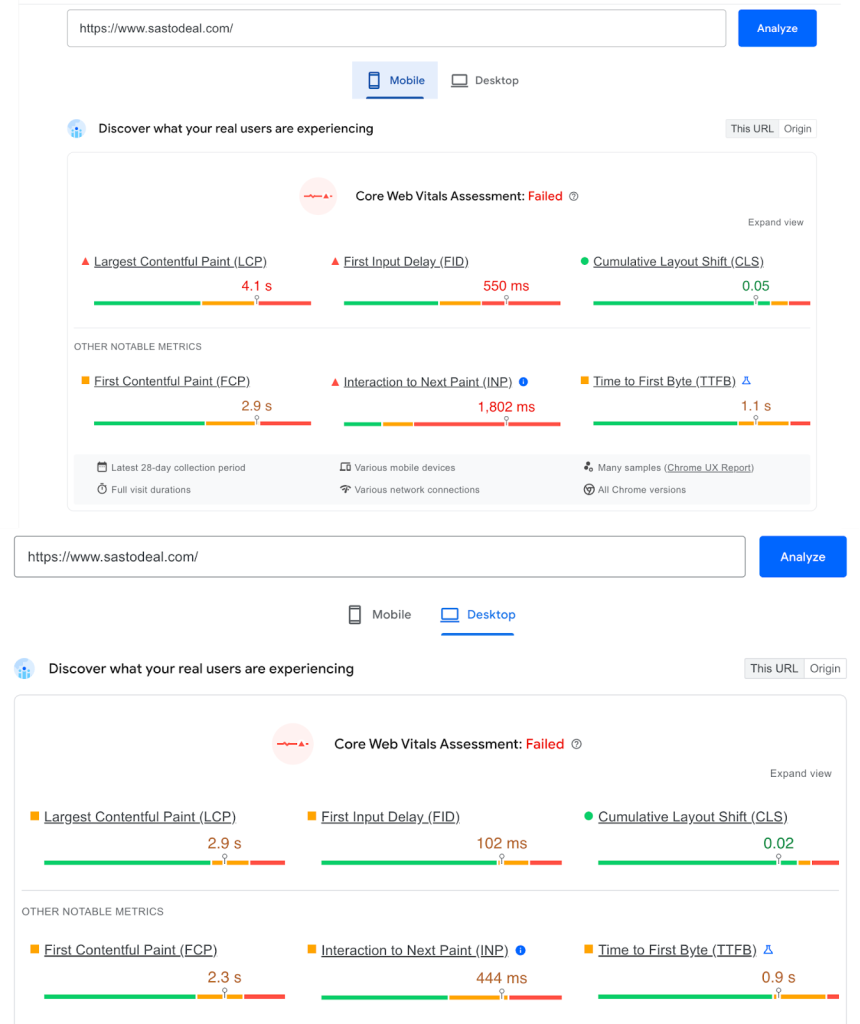
    While Sastodeal shows promising potential in e-commerce, adopting a more aggressive and refined Technical SEO aspects similar to Daraz’s can significantly boost its organic traffic. By learning from Daraz’s successes and implementing these areas of improvement, Sastodeal has the potential to thrive again in the e-commerce marketplace in Nepal.

    This post is a snippet of the Technical SEO aspects from the full SEO comparison. Read the full SEO comparative case study here.

  • How to perform technical SEO audit? [9 Steps With Checklist]

    How to perform technical SEO audit? [9 Steps With Checklist]

    If you are thinking about how to perform technical SEO audit, this guide will provide you with some useful tips.

    Conducting a technical SEO audit is not an easy task and it can be time-consuming. But it is something that needs to be done periodically in order to make sure that your site is up-to-date with all the latest changes in search engine algorithms and guidelines.

    The most important thing is to identify the problem and find the solution. For example, if your site has a lot of HTTP mixed content errors, then you should use a site crawler to find out which pages have the mixed content and start fixing.

    But, it’s not always easy and if you’re a beginner in technical SEO it’s even harder. So, I’ve prepared 9 steps you can follow to perform a basic technical SEO audit.

    But, before that, let’s go over the technical SEO basics.

    What is technical SEO? Why is it important?

    Technical SEO is about making sure that the website is complying with the best technical practices. It includes things like ensuring that your website’s content is readable by search engine crawlers, ensuring that your pages have a title tag, and so on.

    Technical SEO is a subset of SEO which focuses on the technical aspects of getting a website to rank higher in search engine results pages.

    A lot of people think that technical SEO is not as important as On-page SEO because they don’t understand how it works and what it does.

    But this couldn’t be further from the truth – technical SEO is important. Technical SEO makes sure that your site is crawlable and indexable by the search engines. If the search engines cannot crawl the website, they cannot index it and your target audience cannot see it.

    When to perform technical SEO audit?

    The technical SEO audit is a deep dive into the website’s technical aspects and how they affect the site’s search engine rankings. The audit should be performed at least every six months in order to identify any changes that might have occurred.

    The technical SEO audit should be performed when you notice that your rankings are decreasing, when you have made significant changes to your site or content, or when you want to make sure your site is optimized for mobile devices.

    Things to consider when performing technical SEO audit

    There are many elements that need to be considered when performing a technical SEO audit. The following are major of those elements:

    Mobile optimization: Google has been focusing on mobile optimization, and a website with good mobile experience will rank higher than one without it.

    Crawlability: if there are any errors in the code or problems with crawlability, it affects the site’s ranking in SERP.

    Page speed: the page load time is an important factor for Google, which can affect the site’s ranking in SERP.

    9 Steps to perform technical SEO audit

    I’ve covered 9 steps to ease you during your technical SEO audit.

    1. Crawl the website
    2. Review the sitemap and robots.txt
    3. Perform speed test
    4. Check mobile friendliness
    5. Check structured data (schema)
    6. Check links
    7. Check response code issues
    8. Check the tracking and verification
    9. Prioritize the generated issues and start fixing

    Crawl the website

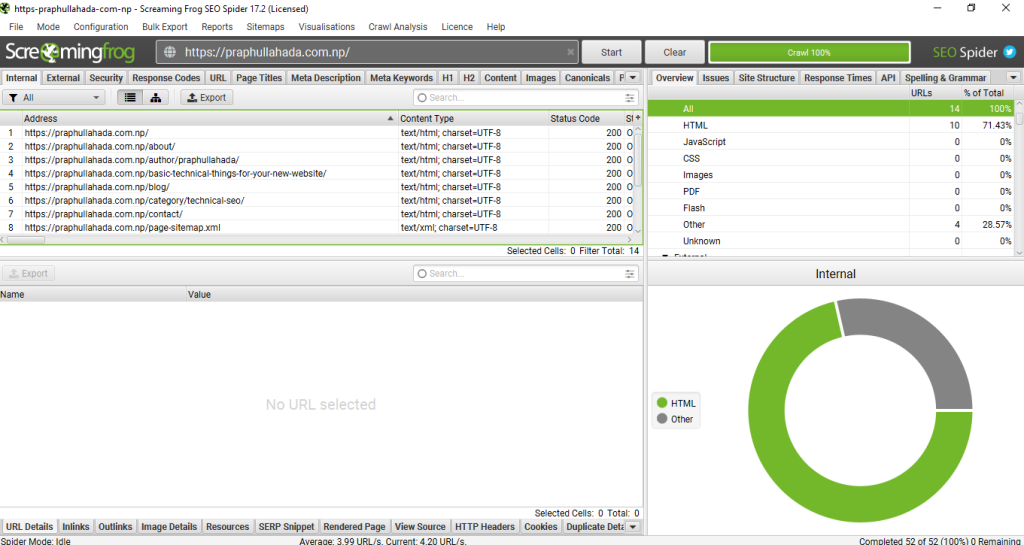
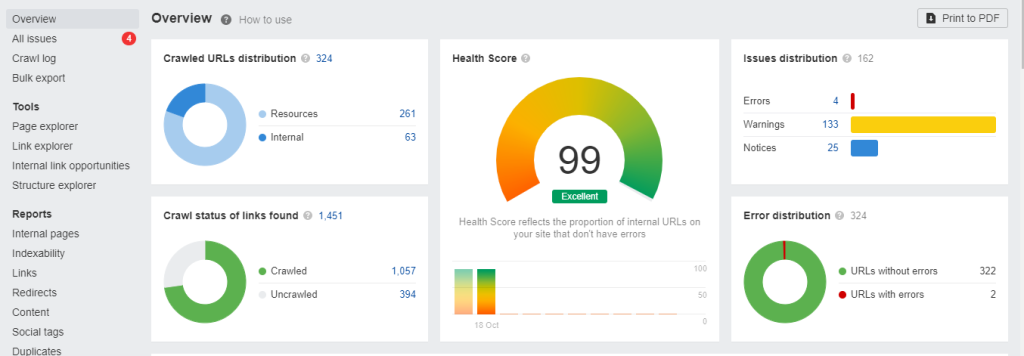
    The first step in auditing technical aspects of the website is to crawl the website. To do that, I recommend using two of my favorite SEO technical audit tools; Screaming Frog and Ahrefs.

    Screaming Frog

    Screaming Frog is my favorite tool when auditing a website. Its feature of crawl tree graph is helpful when auditing the site structure.

    From choosing different configurations and to get different reports regarding the response codes, indexability, crawlability, and even javascript rendering, it reports it all. Screaming Frog covers all the aspects of technical SEO

    That’s why for me, it is the all-rounder SEO audit tool when auditing the whole website.

    To crawl the website in Screaming Frog:

    1. Open Screaming Frog app
    2. Select the mode you want from the menu section
    3. You can crawl the whole website
    4. You can crawl the specific sitemap
    5. Start the crawl

    Ahrefs

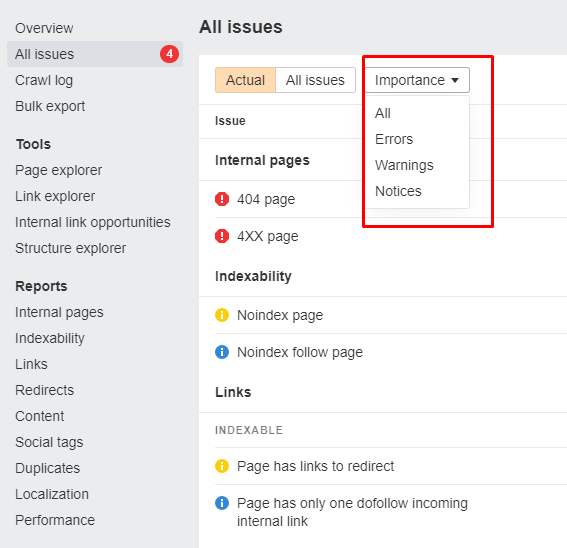
    Another favorite SEO tool is Ahrefs. While screaming frog is best in terms of technical SEO audit, Ahrefs is great for all matters. It shows the issues to be fixed after the site is crawled and prioritizes on the basis of Errors, Warnings, and Notices.

    To put the site on crawl in Ahrefs;

    1. Log in into your Ahrefs account
    2. Click on site audit in the menu section
    3. Click on +New Project
    4. Fill in the details of your website and start the crawl

    Review the sitemap and robots.txt

    Reviewing the sitemap and robots.txt is the second step I do when conducting the technical SEO audit. These are also the basic things to do for your new website.

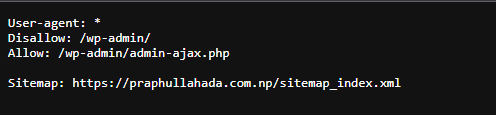
    Making sure everything is okay in Robots.txt file makes sure the website is crawlable. Sometimes, a tiny ‘/’ in Disallow: section in robots.txt makes the whole website not crawlable.

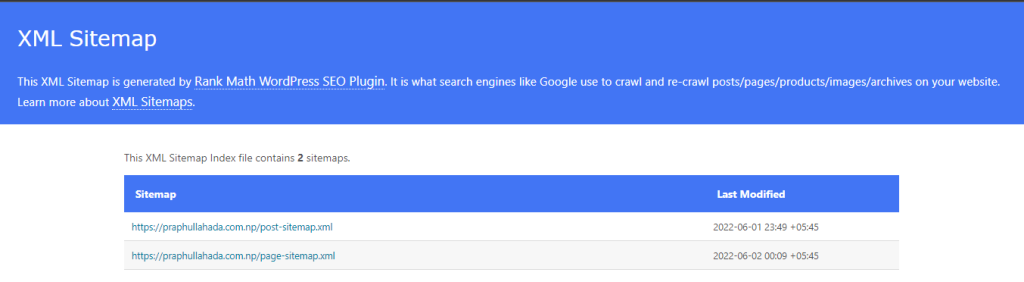
    Also, optimizing sitemap, particularly XML sitemap is important so that search engines get the most important pages of your website. Optimizing sitemap will also reduce your crawl budget for the large sites.

    For WordPress users, robots.txt and XML sitemaps are handled by SEO plugins like Rank Math.

    robots.txt-example
    sitemap.xml-example

    Perform speed test

    Performing a webpage speed test is an important step in ensuring that the user experience on your website is as smooth and seamless as possible.

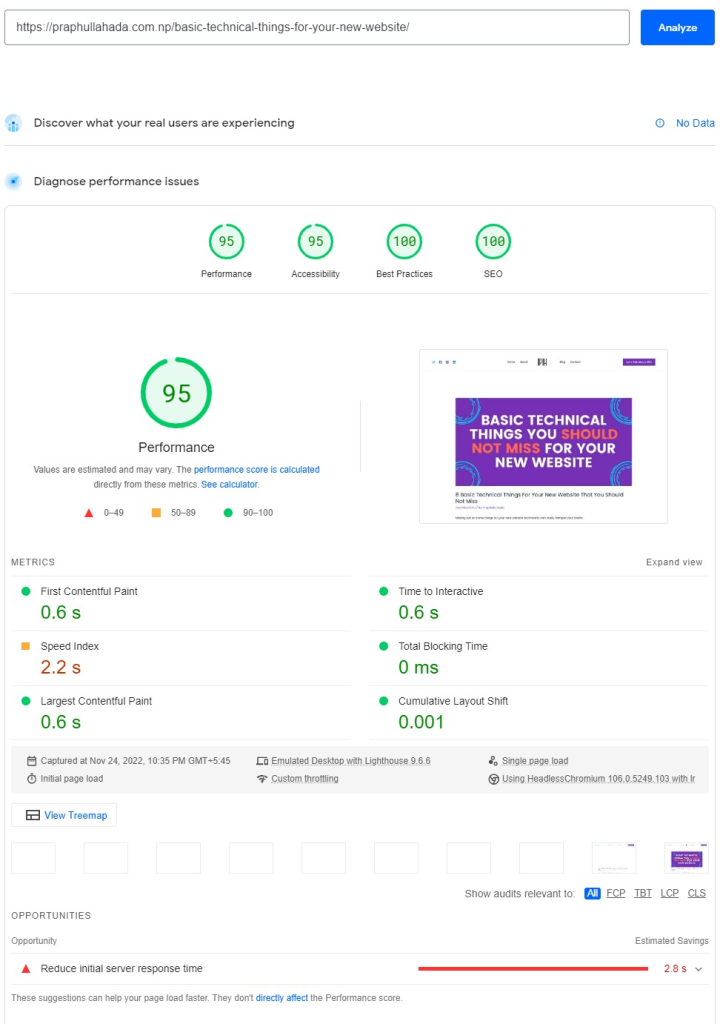
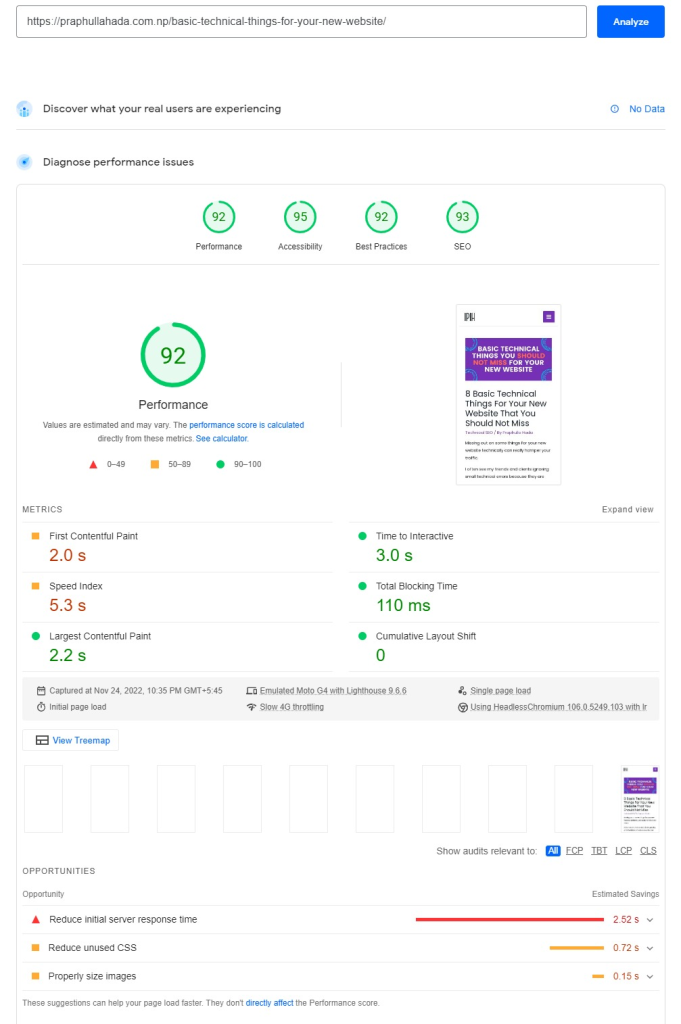
    The most popular tool for performing this type of test is Google PageSpeed Insights. It provides a score and a set of recommendations to make your site faster. The more page speed score, the better.

    Here’s a snapshot for one of my webpages from testing in Google PSI..

    Note: Make sure while performing the speed test, you take your time and test multiple page types. Like in an e-commerce website you should perform speed tests on the homepage, category page, and a blog post.

    Check mobile-friendliness

    When it comes to optimizing a website for search engine rankings, mobile-friendliness is one of the most important factors to consider.

    With an increasing number of people using mobile devices to access the internet, it is essential that your website can be viewed and used easily on smartphones and tablets.

    There are a number of ways to check whether your website is mobile-friendly, and Google provides a free tool to help you do this.

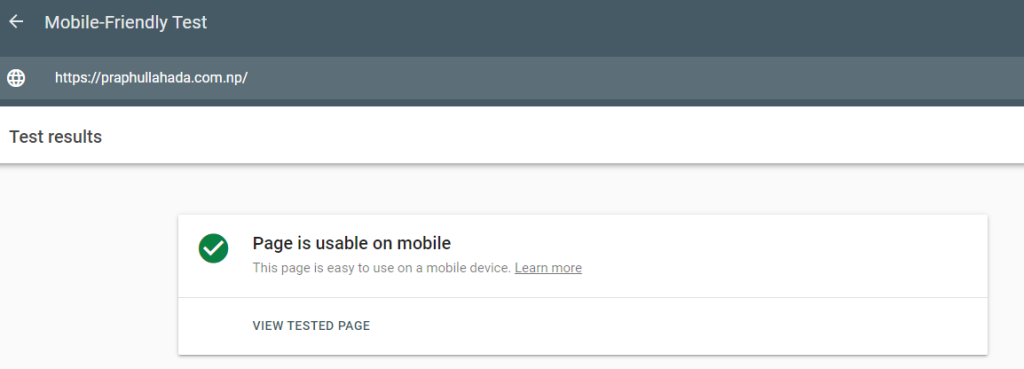
    The Google Mobile-Friendly Test tool checks a web page for certain factors that indicate how mobile-friendly it is.

    These factors include font size, viewport configuration, and use of touch elements. If your website fails any of these tests, it may not be ranking as highly as it could in search results.

    To improve your website’s ranking, you should make sure that it is mobile-friendly and meets all the requirements set by Google.

    mobile friendly test

    Check structured data (schema)

    Search engines use schema markup to better understand the content of a website. This is done by adding code to the website that defines the structure of the page. This code is called schema or structured data.

    I’ve written a detailed guide on Schema or Structured data. To know about it, you can visit Structured data in SEO.

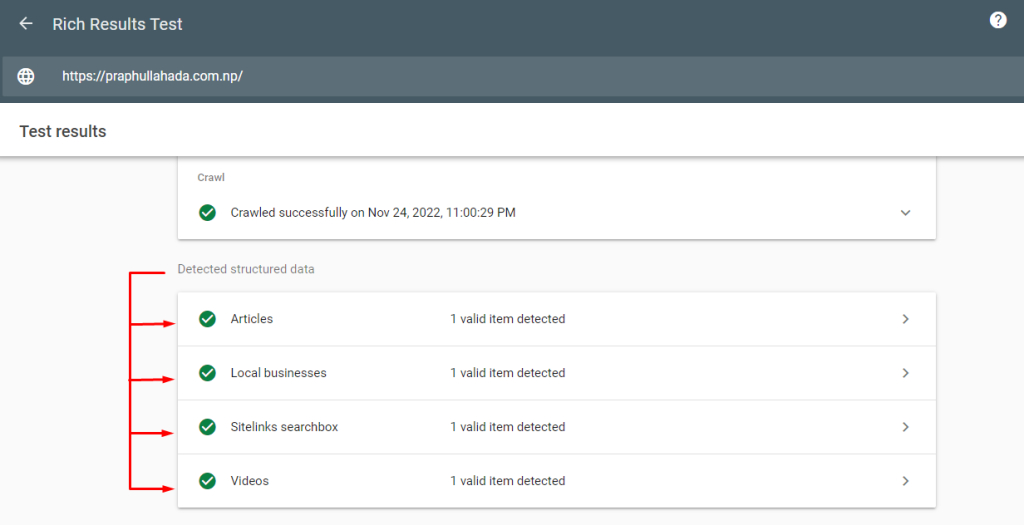
    One way to check if a website has schema markup is to use the Google Rich Snippet Testing Tool. validator. This is a tool that checks the code on a website and tells you if it is valid or not.

    To use the tool, simply enter the URL of the website you want to check and click “Validate.” The results will show you if there are any errors in the code and provide information on how to fix them.

    testing rich results

    4 types of structured data are detected on my homepage by the tool.

    rich results type

    Check links

    When evaluating the trustworthiness and authority of a web page, checking its links is an important step. Links can provide valuable information about a page, such as where it is linked from and how reputable those sources are. Checking links can also help reveal any potential issues with a page, such as broken links or links to malicious websites.

    To check links on a web page, first open the page in Chrome. Then, right-click anywhere on the page and select “Inspect.” This will open the Chrome Developer Tools.

    From the Developer Tools menu, select the “Elements” tab. This will show all of the elements on the page, including the links.

    To inspect a link, click on it. This will show you all of the information about the link, including its target URL, its “rel” attribute, and its type attribute.

    You can also use the Developer Tools to check for broken links. To do this, select the “Audits” tab and then select “broken links.” This will show you all of the broken links on the page.

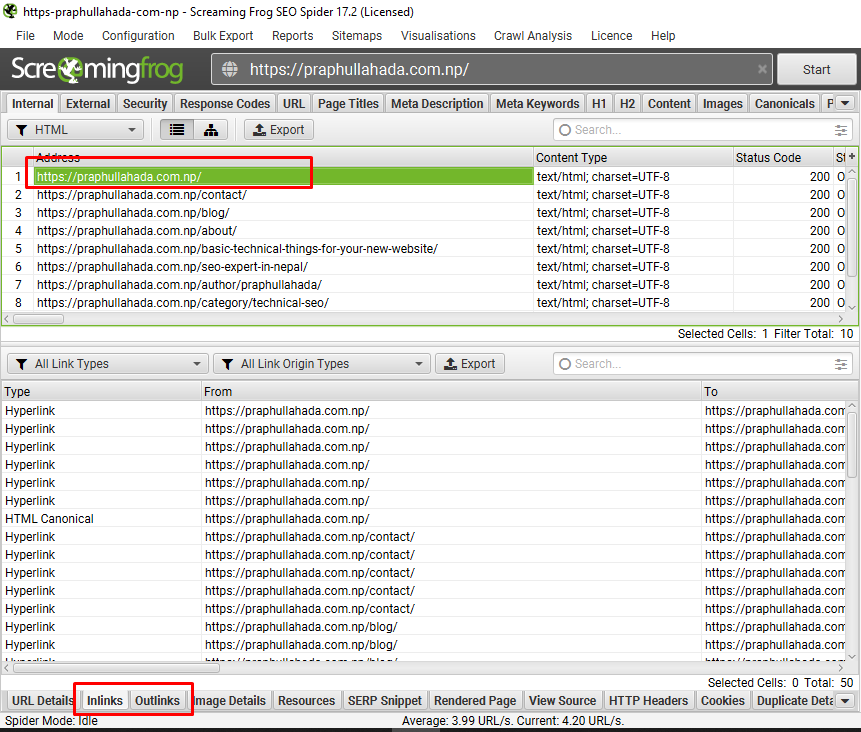
    Moreover, you can also use tools like Screaming Frog, and Ahrefs to check the links.

    screaming frog checking links

    Check response codes

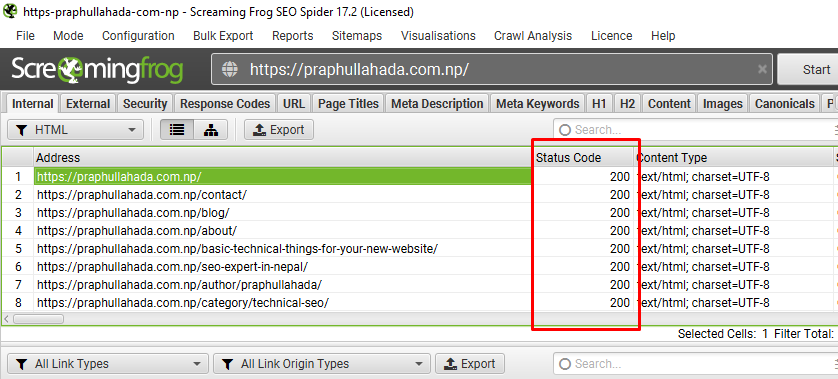
    While performing technical SEO audits, webmasters use response codes to check the status of their web pages and links. Response codes can be generated by web servers or search engine bots. The most common response codes are 200, 301, 302, 404, and 500.

    • Response code 200 indicates that the webpage or link is available and functioning properly.
    • Response code 301 indicates that the webpage or link has been moved to a new location.
    • Response code 302 indicates that the webpage or link is temporarily unavailable.
    • Response code 404 indicates that the webpage or link is not found.
    • Response code 500 indicates a server error.

    Webmasters should check the response codes of their web pages and links on a regular basis to ensure that their websites are functioning properly.

    In Screaming Frog, the response code is shown as status code.

    screaming frog response code

    Check the tracking codes and verification

    Setting up Google Search Console and Google Analytics is a basic thing to monitor the performance and the traffic of your webpage.

    There’s a saying, “If you can’t measure it, you can’t improve it.” So, proper tracking and verification is needed in order to properly measure the data.

    When performing the technical SEO audit, It’s a job for the auditor to check and verify the tracking codes are working fine and proper data is collected. Missing valuable data could lead to an overall ineffective SEO strategy.

    Prioritize the generated issues and start fixing

    The final step after auditing the website technically is to prioritize the technical errors and start fixing.

    Focus your time on the things that matter the most. Ahrefs has made it easy and prioritized the errors. So, you can start working on the errors and make your website technically error free.

    ahrefs error categorization

    SEO Technical Audit Checklist/Report Template

    Now, for the full technical SEO audit checklist. This checklist is inspired by Moz. You can use this checklist and present it as a technical SEO audit report to your client directly too.

    You can download or view the checklist from the button below.

    Facing trouble with the Technical SEO audit? Contact an SEO Expert In Nepal.

  • Basic Technical Things For Your New Website

    Basic Technical Things For Your New Website

    Missing out on some things for your new website technically can really hamper your traffic.

    I often see my friends and clients ignoring small technical errors because they are SMALL and they are SCARED to work on those errors. But, they’ll cause BIG problems later in the future.

    So, it’s better to work on those technical errors now than deal with them later. So, follow through the blog and learn what are the basic technical things for your new website that you should definitely check.

    Incase for the older sites, we should perform periodical technical SEO audits. If you do not know how do it, I’ve written a detailed post on How to perform technical SEO audit?

    Now, in this post let’s talk about the technical SEO perspective for the new websites.

    Basic Technical Things You Should Look Onto For Your New Website:

    HTTPS:

    One of the most important things you should fix first for your new website. Cheap hosting with a non-secured hypertext transfer protocol can be expensive in terms of SEO, crawling, indexing and ranking of your website.

    This being said a secure site is a happy path for the web crawlers to crawl on. You need a secure site to make users feel safe to share their information (if needed). Although all websites should get HTTPS status, eCommerce websites must have it at any cost because of transactions safety.

    Robots.txt

    Robots.txt is important for better crawling of the website. It acts as a mediator to the website. It is the bouncer that stands at the gate of a nightclub. As bouncer checks and lets, people go through who are only allowed to enter the nightclub, robots.txt lets only allowed bots crawl the website.

    If a website doesn’t have robots.txt, every bot would enter the website and can hamper the crawling. So, a proper robots.txt is needed.

    Robots.txt exists in the root folder of your website. SEO plugins in WordPress can automatically generate a robots.txt file for you.

    robots txt example

    Add sitemap URL in robots for better crawlability.

    XML Sitemap

    As Robots.txt is the bouncer that stands at the gate, Sitemap.xml is the one inside the nightclub that directs us to our destination. It shows the way to the important pages for bots to crawl. If there is no sitemap, bots would not be able to crawl effectively. They would just roam around without any clue.

    Sitemap as the name defines is a map of the site. Be careful while putting pages on the sitemap. A proper sitemap can do wonders for web crawlers to crawl.

    SEO plugins can generate sitemaps. Or, any online sitemap generator tool can be helpful.

    The sitemap should be placed in the root folder of your website if you are into manual coding.

    xml sitemap example

    Proper URL Structure

    Short and exact keyword URLs are the best in terms of user experience, web crawlers and SEO. An exact keyword URL is easy to read by bots. So, they can get the proper information about the content beforehand.

    The long URLs that contain numbers are outdated and nobody recommends them now. They become a pain to SEOrs in the long term.

    Be extra careful while choosing a permalink structure because the frequent change in URL is a bad signal for web bots for crawling.

    Suggestion for optimized URL in terms of SEO: domainname.com/post-name

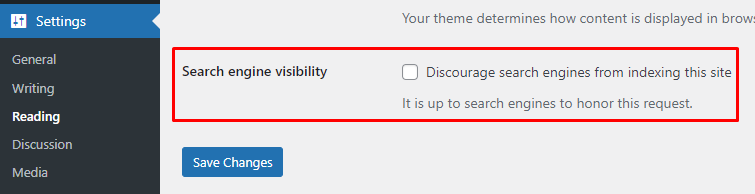
    Discourage From Search Engine

    A lot of WordPress website owners who are new forget to untick the discourage from the Search Engine option from the WordPress backend. This leads to the new website in no crawl at all.

    This single option can be very harmful to your newly developed WordPress website.

    To check and uncheck this option in WordPress, go to Dashboard > Settings > Reading.

    discourage setting in wordpress

    For hardcoded websites, make sure all pages have meta robots tag of an index,follow.

    Set Up Google Search Console (GSC)

    For newly developed websites, immediate tracking can give an extra boost in traffic. For the tracking, Google Search Console should be used.

    Google Search Console lets you easily monitor and in some cases resolve server errors, site load issues, and security issues like hacking and malware.

    You can also use it to ensure any site maintenance or adjustments you make happen smoothly with respect to search performance. The best part? IT IS FREE.

    You’ll get insights into top pages, top queries, website performance, its coverage, click-through rate, valid pages, schema enhancements, manual actions and penalties, and many many more.

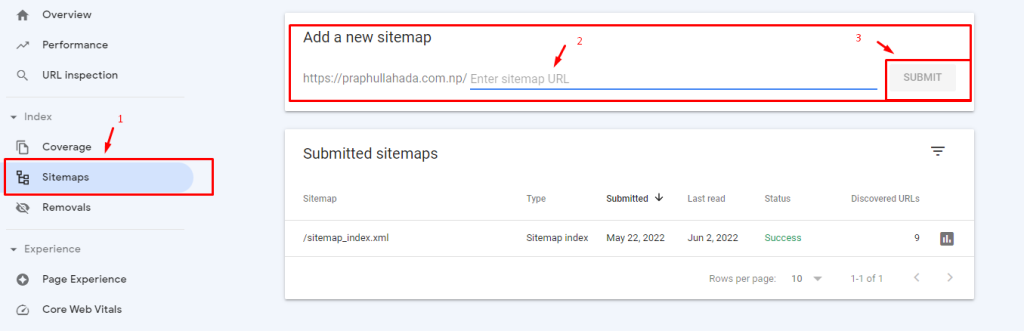
    Make sure to add a sitemap in the sitemap section of GSC.

    adding sitemap in gsc

    Set Up Google Analytics

    After Google Search Console, another free traffic tracking tool from Google is Google Analytics.

    Google Analytics helps you to keep a track of all the content that receives views and shares.

    With this data, you can enhance the top viewed blogs so that they appeal to the customers in a more productive manner.

    Google Analytics generates a breakdown of the page views each of your blog posts receives.

    Don’t know how to configure Google Analytics? Visit Get Started with Analytics.

    Add Schema Markup

    Schema or structured data in SEO is important for feeding the right and exact information to Google. For a new website, feeding the necessary information directly can be beneficial in many aspects.

    For WordPress websites, SEO plugins can generate a basic schema that is enough for a new small website. But, in case you want to give your all in the schema, I recommend going through schema.org vocabulary first and then playing around with some tools like technical SEO schema markup generator.

    Basic Tools for performing Technical SEO for the new website:

    Google Search Console
    -To track the website performance and coverage issues

    Page Speed Insights/ GT Metrix
    -To check the website speed, observe website performance and recommendations

    Ahrefs Webmaster Tools
    -To check for technical errors on the website. The free version of Ahrefs with limited crawl and features of the Advanced Ahrefs tool

    Screaming Frog
    -For technical site audit and check technical errors

    SEO Plugins / Online Generator Tools
    -To generate robots.txt, sitemap.xml, and basic schema structure in terms of WordPress.

    Online robots and sitemap generator tools to manually generate the required files

    Schema Markup Creator and Validator
    -To generate structured data I personally recommend the Technical SEO Markup Generator Tool.

    To validate the generated schema markup, Schema org validator.

    Having trouble setting up these technical things? Contact an SEO Expert In Nepal.

  • Structured Data in SEO -What is it and How It Helps in SEO?

    Structured Data in SEO -What is it and How It Helps in SEO?

    You’ve set up a new site and you’ve also covered all the basic technical things for your new site. You’ve done your research and done everything you could. But, your ranking pauses even when you’ve optimized your website. If so, structured data (advanced) can help you move the needle in Google SERP. Structured data in SEO is an add-on bonus to all of your hard work in SEO.

    So, what is structured data, and how can you get benefits from it?

    Every SEO who is on the path to becoming an SEO Expert should learn about it.

    What is Structured Data? (In Layman’s Term)

    Structured Data are data that are present within a fixed field of a file or a record.

    These markups can be in many formats; RDFa, Microdata, and JSON-LD which are beneficial in SEO.

    We can use RDFa and Microdata, too, but I’ll be focusing on JSON-LD in this article because Google recommends it.

    Before jumping into details, here are guidelines for structured data in SEO by Google.

    In terms of SEO, structured data are organized grouped texts that provide exact information that helps search engines understand the context better.

    It means web crawlers can understand your information in the way you want them to know.

    Let’s take the example of structured data.

    Ram (A typical name, for example) has to go to Point A. Shyam (Another typical name, for example) is describing the path to Ram.

    Shyam goes like; You need to go here. You’ll see a loooooong tree. Then, take a right.. go there.. come here.. do this.. do that… You’ll see a white house with three greeeat windows… Go to this shop… Go up to here. And, take right. Walk… This and that…

    Shyam told Ram all the information he could to get to point A.

    Shyam describes the path to Ram in a looong format which Ram understood but felt really bored while listening. (Everyone gets bored listening to a long talk)

    We can view the above direction description as the general content of the webpage.

    Now, how could Shyam have described the direction to Ram?

    Easy… He could have told Ram precisely what he needed to do.

    Go to this bus station. Take this bus. Find this landmark. Walk in the North direction for about 239 meters, and you’ll reach Point A.

    The second description is exact, and Ram got all the information he needed to get to Point A. Ram is happy and not bored. Ram got what he needed, and now he can proceed in moving to Point A.

    This exact information Shyam described to Ram is what I call structured data. (Of course, the markup structure is incorrect, but I’ll get into that a little later.)

    As for SEO, we must feed the Google or Search Engine bots with this exact information structured in markups.

    You get all the freedom to feed the data as schema, helping your content understand and rank better.

    JSON-LD Schema for SEO

    Now, let’s talk about JSON-LD schema structure.

    Using JSON-LD schema is common nowadays to serve mark up information to Google, Bing, and other search engine bots.

    It looks something like this:

    <script type=”application/ld+json”>

    {

    “@context”: “https://schema.org/”,

    “@type”: “Person”,

    “name”: “Praphulla Hada”,

    “url”: “http://localhost/www/praphulla/”,

    “image”: “http://localhost/www/praphulla/wp-content/uploads/2021/08/SEO-Specialist-Nepal-Praphulla-Hada.webp”,

    “sameAs”: [

    “https://www.facebook.com/praphulla.hada”,

    “https://twitter.com/praphulla_hada”,

    “https://www.instagram.com/praphulla_hada/”,

    “https://www.linkedin.com/in/praphulla-hada/”

    ],

    “jobTitle”: “SEO Expert”,

    “worksFor”: {

    “@type”: “Organization”,

    “name”: “Orka Socials”

    }

    }

    </script>

    There are multiple tools (easy) that will help you generate schema mark up.

    I’ll talk about them later.

    Let’s learn how the structured data works from the above example.

    The <script type …..> is the type of the script. Here, it is JSON-LD.

    Now, the part context is schema.org meaning the context/information/data used below belongs under schema.org vocabulary.

    The Person is a type, denoted by @type and all that comes under @… are the additional data properties for the type. For the above example, it is the name, URL, image, and Job Title.

    I know it can be a little confusing, but it will get better. If you’re not that much in technical stuff, all you got to know is that a property has an expected type.

    Again, if we take the example of Shyam from the previous section.

    Shyam = Person,

    He has:

    Hands = 2

    Eyes = 2

    Heart =1

    etc…

    These are exact information we can give to bots to guide them about Shyam. All that is left is the structuring of the data.

    Eeeasy right??

    Now that you’ve gained a basic understanding of schema, let’s see how to generate structured data.

    Tools for Generating Structured Data

    Online markup generators

    Technical SEO Schema Mark up Generator by Merkle

    Google structured data markup helper

    Structured data generator by J.D. Flynn

    JSON-LD playground

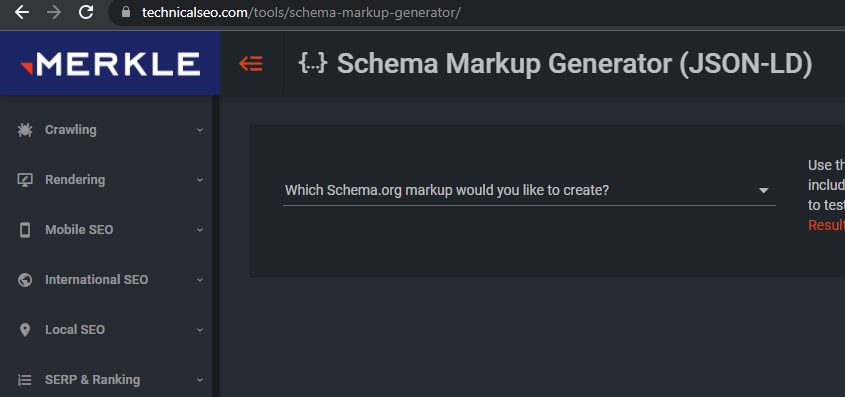
    I recommend going with Technical SEO Schema Markup Generator by Merkle. It is easy to use, and it covers almost all of the properties you will need for your schema markup generator.

    technical-seo-schema-generator-tool

    WordPress plugins for structured data

    SEO Plugins like Yoast SEO, SEO Press, Rank Math, Smart Crawl, All in One SEO

    WP SEO Structured data schema

    Schema App

    SEO plugins can generate a decent schema for your pages and posts. I personally use Rank Math SEO.

    Shopify Apps

    SEO Manager

    Smart SEO

    Libraries for DEVs

    JSON-LD on npm.org

    After you’ve created a schema script, it is time to test it. For validating the schema markup, you can use the following tools.

    Note: Generally, while creating the schema from the above-mentioned tools, there might be warnings, but the probability of getting errors is significantly less.

    Tools to Validate the Schema Markup

    To validate the schema markup script, we can use any of the following structured data testing tools;

    Google Rich Snippet

    Schema.org Schema Validator (Previously Google Structured Data Testing Tool)

    JSON-LD Playground

    Yandex Structured Data Validator

    I recommend using either Google Rich Snippet or Schema.org Schema validator as they both are easy to use.

    Both tools can quickly validate schema scripts showing errors and warnings (if present).

    The Google Rich Snippet tool is helpful in validating schema structures like Recipes, Products, etc., while Schema. Org Schema validator is helpful for schema structures like Organization, Person, Local Business, etc.

    To validate with Google’s schema validator tools, copy the schema code and paste it into the code section of the validator. Or, to validate the code for the live URL (already present in the webpage), copy and insert the URL in the URL section.

    Now that you have successfully created and validated Schema Scripts, you must implement them on your website.

    There are several ways to implement Schema in the Website.

    Implementing the Structured Data for SEO

    Insert Headers and Footers Plugin for WordPress

    Sogo Header and Footer Plugin

    Custom Code for a single page (for WordPress, adding custom fields is recommended)

    Custom Code in header.php file (Not recommended) (it makes a specific code applicable to all pages)

    For Shopify, the above-mentioned schema generating apps automatically add the scripts. In the case of custom code,

    you can add the code in header.liquid template section. (not recommended)

    Get Shopify experts’ answers.

    Once you’ve implemented the schema code, validate it again to see any additional errors and warnings.

    If there are no errors and warnings,

    CONGRATULATIONS!! YOU HAVE SUCCESSFULLY IMPLEMENTED STRUCTURED DATA.

    That’s it. Your website is now ready to show structured data (schema) in the SERP.

    TL;DR

    Structured Data are data that are present within a fixed field of a file or a record.

    These markups can be in many formats; RDFa, Microdata, and JSON-LD are the ones that are beneficial in SEO. Recommended by Google is JSON-LD.

    You can use Technical SEO Schema Markup Generator Tool to generate schema.

    Validate the Schema markup script with Google Rich Snippet Testing Tool or Schema.Org Schema Validator.

    Implement the schema script on the website and validate again for any additional errors and warnings.